
Automation becomes brittle when each workflow node receives data in a shape it does not expect. A CRM may return nested contact details, a webhook may deliver an array, and a spreadsheet may require a flat row. Effective n8n workflow data transformation turns those mismatched structures into predictable inputs and outputs without losing important fields.
This guide explains how to inspect item data, map fields with expressions, use built-in transformation nodes, and write JavaScript in a Code node when the logic demands it. You will also learn to validate results and handle common edge cases so complex workflows stay understandable and maintainable.
Plan n8n workflow data transformation around a clear contract
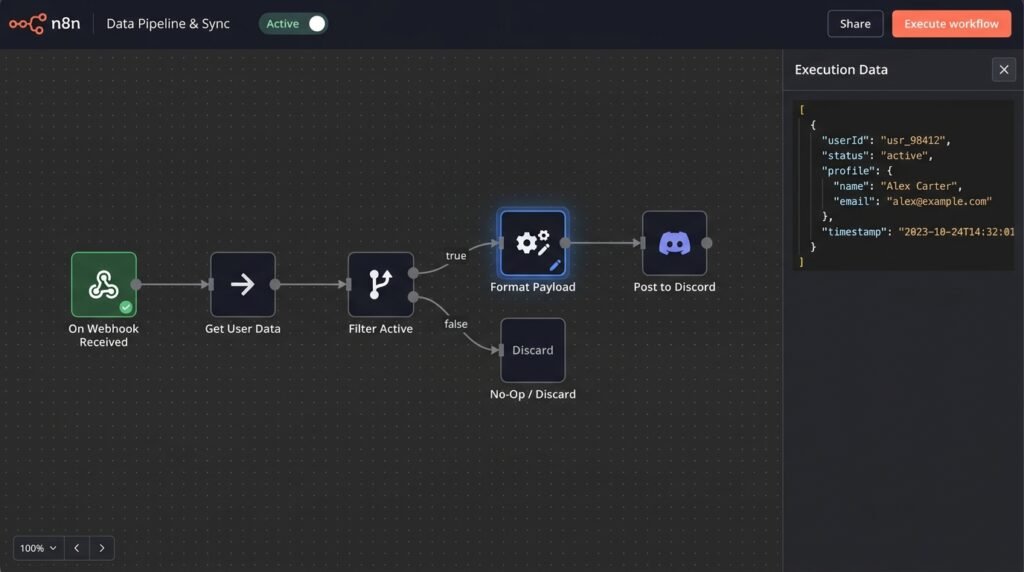
Before changing data, define what the next node must receive. Treat each connection as a small interface: document the expected fields, their types, whether they can be missing, and whether one incoming item represents one record or a group. This contract makes n8n workflow data transformation deliberate instead of a sequence of guesses made while building.
Start by examining real output from the node immediately before your planned change. Execute that node, open its output, and inspect both the item count and the JSON structure. In n8n, workflows commonly pass a collection of items, with each item carrying JSON data and sometimes binary data. A single visible record does not prove that later executions will always contain one item.
For example, an order API might return an item shaped like { order_id: 731, customer: { email: 'lee@example.com', name: 'Lee' }, lines: [{ sku: 'A7', quantity: 2 }] }. A shipping node may need email, recipient, and line_count at the top level. Write down that target shape before mapping. It clarifies whether to keep the original nested object, flatten selected fields, or create a new payload.
- Keep the record grain clear: decide whether an item means an order, a customer, or an individual order line.
- Mark optional values: decide what to do when a phone number or address is absent.
- Separate source and destination names: distinguish an API’s
customer.emailfrom the target’srecipient. - Protect useful context: retain IDs needed later for updates, logging, or error recovery.
The n8n item model is worth reviewing before you build complex mappings. The official n8n documentation on data structure explains how workflow data is represented and helps prevent confusion about items and their JSON. Understanding that model is essential when a node receives multiple records or when a branch changes how data is passed.
Also decide whether the transformation should preserve all input fields. Replacing an item with a small output object may be correct for an external API, but can discard an internal record ID needed three nodes later. Conversely, carrying every field forward can expose unnecessary personal data or create naming collisions. Choose a deliberate policy: keep, remove, or explicitly copy fields.
A useful design note can be brief: “One item per order; output includes orderId, recipient, and lines; missing email routes to review; source ID stays available.” That statement is a practical test for the node you build. If the result does not meet the contract, the issue is visible at the boundary rather than hidden downstream.
Once the expected shape is defined, n8n data mapping between nodes is easier to review. You can check each expression against an intended source path and decide how nulls, arrays, and unexpected types should behave. This simple planning step often saves more time than immediately writing a large Code node.
Use expressions for precise n8n data mapping between nodes
Expressions are a good first choice when a destination field can be derived from one or a few known values. In a node field, switch to expression mode and reference data from the current item or another node. Expressions keep straightforward mappings close to the field that uses them, which makes small changes easier to understand than a separate block of custom code.
For a current item, a typical expression can read a property such as {{ $json.customer.email }}. To reference another node, use n8n’s node-data helpers, for example {{ $('Webhook').item.json.order_id }}, where the node name must match your workflow. The exact reference depends on item linking and workflow structure, so verify it against a real execution rather than assuming that two nodes always have a one-to-one relationship.
Expressions work well for renaming, composing, and lightly formatting values. A recipient field could use {{ $json.customer.name }}, while a summary could combine an order number and status. Add safe fallbacks when a field is optional, such as {{ $json.customer?.email ?? 'unknown@example.invalid' }}. Use a fallback appropriate to the business case; a placeholder email may be unsuitable if it could trigger a real notification.
- Choose the destination field. Identify the exact property expected by the receiving node or API.
- Reference the source. Use the current item when possible, and use a named node reference only when the value genuinely comes from elsewhere.
- Handle absence. Decide whether to use a default, leave the value empty, or stop and route the record for review.
- Run a representative execution. Check the rendered value, not only the expression text.
This is where json data manipulation n8n becomes practical: an expression can select a nested property, apply a simple conditional, or build a small object without introducing another processing stage. For instance, a boolean flag can be derived from whether a tracking number exists. Keep expressions readable, however. A long chain of nested ternaries is difficult to debug and should usually become a clearer sequence of nodes or a Code node.
Remember that referencing another node can create subtle item-alignment problems. If an upstream node returns five items and another returns one, a reference may not pair values the way you expect. Item linking, branch execution, and node output shape all matter. Test with multiple records and inspect the execution data to confirm the correct source item reaches each destination.
Expressions also make field-level transformations visible to someone reviewing the workflow. Use informative field names and short expressions; add a Set (Edit Fields) node when several related values need to be prepared together. For broader path behavior and JavaScript expression concepts, consult the MDN reference for optional chaining. Its syntax is useful for safely accessing nested properties, while n8n-specific helpers remain documented by n8n.
Use an expression when the mapping is local, deterministic, and easy to test in the field preview. If the mapping needs loops, grouping, complex validation, or repeated conversions, do not force that logic into one expression. The best n8n workflow data transformation keeps simple operations simple and moves complex behavior to an appropriate processing step.
Choose built-in nodes for common transformation patterns
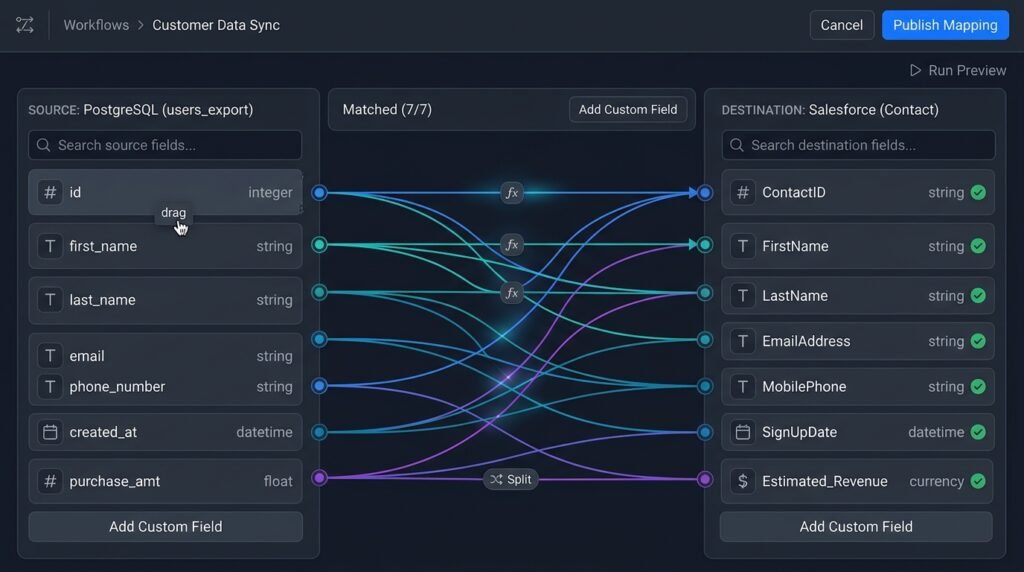
Built-in nodes offer a readable middle ground between individual expressions and custom code. The Edit Fields (Set) node can create, rename, and remove fields; other nodes can split arrays into items, aggregate records, merge streams, or filter data. Use the node whose purpose matches the operation. A workflow made from clear, focused stages is often easier to debug than one large block that performs unrelated work.
For a basic mapping, add Edit Fields after the source node. Define the output fields, assign values with expressions, and choose whether to include other input fields. If a downstream API expects a compact payload, turn off unnecessary fields or explicitly remove them. If later steps need source identifiers, preserve those fields intentionally. Then execute the node and verify the resulting item JSON before connecting the destination.
Consider a webhook that contains an array of product records. If each product must be checked independently, split the array into separate items before applying a filter or making an API request. If the goal is instead to send the whole product list as one request, preserve or rebuild the array as a single field. The choice changes the workflow’s record grain, so make it explicit rather than splitting data just because the array looks inconvenient.
- Set/Edit Fields: select, rename, add, and remove values for a target schema.
- Filter: pass only items that meet a condition, keeping routing logic separate from mapping.
- Merge: combine streams when records have a reliable matching key or a clearly defined position relationship.
- Aggregate: collect multiple items into a grouped structure when the destination expects a batch.
- Split Out: turn an array property into individual items when each element needs independent processing.
The main trade-off is transparency versus node count. Several narrow nodes can make each operation easy to inspect, but excessive one-field nodes clutter the canvas and increase maintenance. Group related field changes in one Edit Fields node; give more consequential steps clear names such as “Normalize order payload” or “Split line items.” A useful workflow visualization should show why the shape changes at each point.
Merge operations deserve special care. Combining by position assumes that item order and item counts align, an assumption that can fail after filtering or API pagination. Matching by a stable identifier is safer when records arrive independently. Before merging, check what happens when a key is missing, duplicated, or present in only one input. Define whether unmatched items should be discarded, retained, or sent down a review path.
For workflows with pagination, a data-shaping stage may need to run for every page rather than once after the first response. The guide to n8n workflow loop patterns for pagination explores how repeated fetches affect workflow design. Keep pagination and transformation responsibilities distinct where possible: fetch the complete set reliably, then normalize the records into the shape downstream logic expects.
Built-in nodes make json data manipulation n8n accessible to teammates who do not write JavaScript. They also expose intermediate output in the execution view, which is valuable when diagnosing a bad field. However, a node cannot infer business meaning. Decide whether an empty string, zero, or absent value represents “unknown,” “not applicable,” or a real value, then encode that decision explicitly in the node configuration.
Use built-ins for common, visible operations and reserve custom logic for cases that do not fit them cleanly. This division keeps the workflow approachable while still allowing sophisticated pipelines. After configuring a node, test both a normal item and a record with missing or unusual data. A successful happy-path preview alone does not prove that the chosen mapping is resilient.
Use a Code node when the mapping needs custom logic
When a transformation involves several conditions, regrouping, or a reusable normalization rule, a Code node can be clearer than a long collection of expressions. The Code node works with workflow items in JavaScript, but its mode matters: choose whether it runs once for all items or once for each item, and shape the returned data to match that mode. Check the node’s current configuration and n8n documentation when behavior depends on version or execution settings.
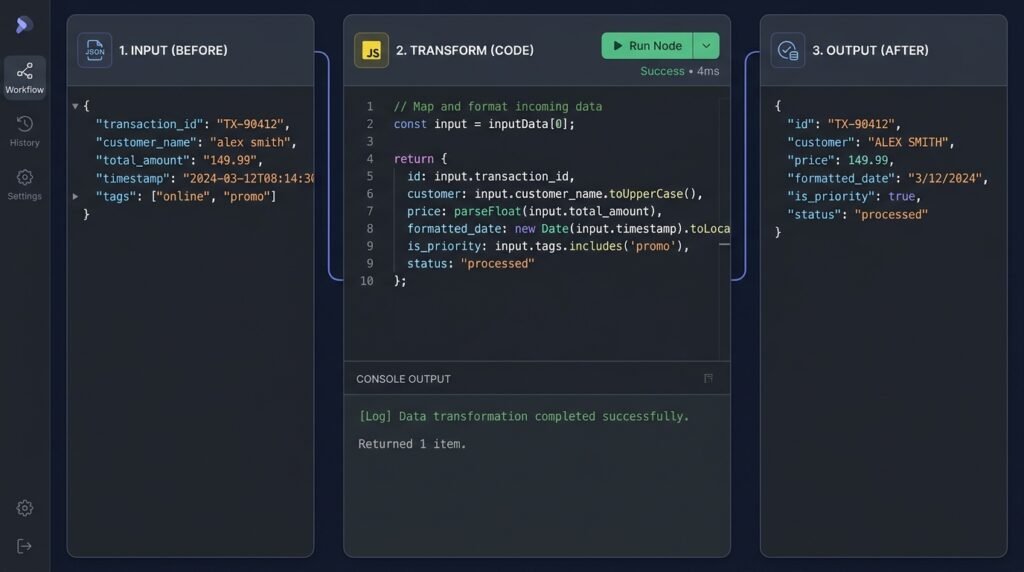
A simple normalization pattern is to map over incoming items, read each item’s JSON, and return a new item with only the fields needed later. Conceptually, the code can create an output object containing orderId: item.json.order_id, email: item.json.customer?.email ?? null, and total: Number(item.json.total ?? 0). In n8n, return items in the format expected by the Code node, typically as objects containing a json property. Do not return bare values if the node expects item objects.
Before coding, state the transformation in plain language: “For each order, flatten the customer email, convert total to a number, and preserve the source order ID.” Then implement only those steps. This keeps n8n workflow data transformation testable and avoids quietly mixing normalization, API calls, and business decisions into one node.
return items.map(item => {
  const source = item.json;
  return {
    json: {
      orderId: source.order_id,
      email: source.customer?.email ?? null,
      total: Number(source.total ?? 0),
      lineCount: Array.isArray(source.lines) ? source.lines.length : 0
    }
  };
});
The example handles absent customer and line data without throwing. But be cautious about coercion: Number('not-set') produces NaN, which may pass unnoticed until a later node serializes or validates it. If malformed numeric input is possible, check the conversion with Number.isFinite and choose a clear response, such as routing the item to an error branch instead of substituting zero.
When working on all items together, operations such as grouping by customer or creating a summary may be more natural. Use a map keyed by a stable customer ID, then return the grouped records in the expected item format. If order matters, preserve it deliberately; grouping can change sequence. If one bad record should not fail the whole batch, validate items individually and attach a clear error result or route invalid data before the Code node.
Readable code is a maintenance feature. Name intermediate variables, avoid deeply nested ternaries, and keep one responsibility per node. Add comments for business rules that are not obvious from the code, such as why a value is rounded or why a particular status is excluded. Avoid embedding secrets in code; use credentials and supported n8n mechanisms for sensitive configuration.
json data manipulation n8n through JavaScript is powerful, but it increases responsibility for testing, type handling, and output shape. Test zero items, one item, several items, missing nested objects, empty arrays, and malformed values. Compare actual output with the contract you wrote earlier. For broader JavaScript details, use reliable language references and keep n8n-specific assumptions grounded in n8n’s documentation.
Choose a Code node when custom logic makes the workflow simpler overall, not merely because coding feels faster. A six-line map may be clearer in code; a dozen unrelated operations may not be. If teammates need to inspect every business rule without reading JavaScript, use built-in nodes or divide the transformation into named, testable stages.
Validate and troubleshoot n8n workflow data transformation
Reliable pipelines are built by testing the boundaries where data changes shape. A node may work with the sample item but fail when a production webhook omits a nested property, returns a string instead of a number, or contains an empty list. Validate the output immediately after each significant mapping step. That makes it clear which node introduced a missing field, unexpected type, or change in item count.
Use a compact test set with representative cases: a normal record, a record with optional fields missing, an empty array, a value of zero, and a malformed value. Include multiple items when the workflow is expected to process batches. Inspect both the JSON fields and the number of items after each node. If the count unexpectedly changes, investigate filters, splits, merges, and branches before checking individual expressions.
- Confirm the source path. Inspect the executed node output and verify spelling, nesting, and capitalization.
- Check the type. Determine whether the value is a string, number, boolean, object, array, or null.
- Review the item count. Confirm that each transformation preserves, splits, combines, or filters items as intended.
- Inspect the final payload. Compare actual output with the destination contract, including required fields and unwanted extras.
- Test failure handling. Decide what happens when data is incomplete or an API rejects the mapped result.
Common failures have recognizable causes. An undefined value often points to an incorrect path or an optional field that was not handled. A duplicated result may indicate a merge relationship or loop that processes the same record more than once. Missing records can come from a filter condition or a branch that does not reconnect as expected. When a downstream service rejects a payload, inspect the transmitted structure and types rather than assuming the API is at fault.
For json data manipulation n8n, preserve a distinction between missing, null, empty string, and zero. These values can mean different things to receiving systems. A fallback such as value || default treats zero and an empty string as false, which may erase valid input. Use nullish coalescing when only null or undefined should trigger a default, and validate values when business rules require more than a syntactic fallback.
Keep transformations observable. Name nodes according to their function, make intermediate outputs easy to inspect, and route records that fail validation to a deliberate error path. For workflows with important approvals or human review, a dedicated branch can prevent malformed data from reaching an irreversible action. The related guide to n8n workflow branching strategies can help organize those routes without making the main processing path confusing.
Consider data privacy as part of validation. A mapping step should send only fields the next system needs, especially when records contain personal or confidential information. Removing unused properties reduces accidental exposure and makes payloads easier to inspect. Keep identifiers needed for traceability, but avoid copying sensitive data into logs or error messages unless there is a clear, protected operational reason.
For complex workflows, test a saved execution after making a mapping change and compare it with a known-good result. If a transformation is used in several workflows, document its expected input and output and consider a reusable sub-workflow where appropriate. The goal is not to add process for its own sake; it is to make failures diagnosable and changes safe to review.
A dependable n8n workflow data transformation is not simply one that produces the desired output once. It should behave predictably across normal, incomplete, and malformed inputs, preserve the identifiers needed for follow-up, and fail in a way that an operator can understand. Those qualities make the workflow easier to scale and safer to hand off.
FAQ: n8n workflow data transformation
Should I use expressions or a Code node?
Use expressions for direct field references, small formatting tasks, and simple defaults. Choose a Code node when you need loops, grouping, reusable validation, or several related conditions that would make an expression hard to read. Built-in nodes are often best for common operations such as filtering, splitting, merging, or selecting fields.
How do I reference data from an earlier node?
Use n8n’s expression helpers to reference the named node and its output, then confirm the reference with an execution. The correct pairing depends on item linking and workflow structure. Test with multiple records, especially when the referenced node and current node produce different item counts.
How can I keep fields that the next node still needs?
Decide whether to preserve input fields or build a minimal output object. Retain necessary source IDs and traceability values intentionally; remove unrelated or sensitive properties. Check the output after your Edit Fields or Code node so later steps do not depend on fields that were accidentally dropped.
What is the safest way to handle missing nested properties?
Use optional access and a deliberate fallback, or validate the record and route it for review. Do not use a placeholder that might trigger a real action. Distinguish missing values from valid zeroes, empty strings, and nulls, because those states may have different meanings.
Why does a merge produce unexpected records?
A merge can behave unexpectedly when inputs have different counts, order, or matching keys. Prefer a stable identifier over position when records arrive independently. Check the behavior for missing and duplicate keys, then test the merge with mismatched sample inputs.
How do I check whether a transformation is correct?
Compare the node output with a written input-output contract. Test ordinary data, missing optional fields, empty arrays, unusual types, and multiple items. Confirm both the resulting fields and item count, then verify that the receiving node accepts the payload.
Conclusion: build transformations that stay maintainable
Good data shaping starts with a clear output contract, then uses the simplest suitable tool: expressions for concise mappings, built-in nodes for common operations, and JavaScript when custom logic is genuinely needed. Test realistic edge cases, protect important identifiers, and make failures visible before they reach a downstream service.
Use these practices to make n8n workflow data transformation more predictable across the full pipeline. If you want help designing or improving an automation system, talk with Seelaunch about your workflow goals and take the next step toward a dependable automation.

