
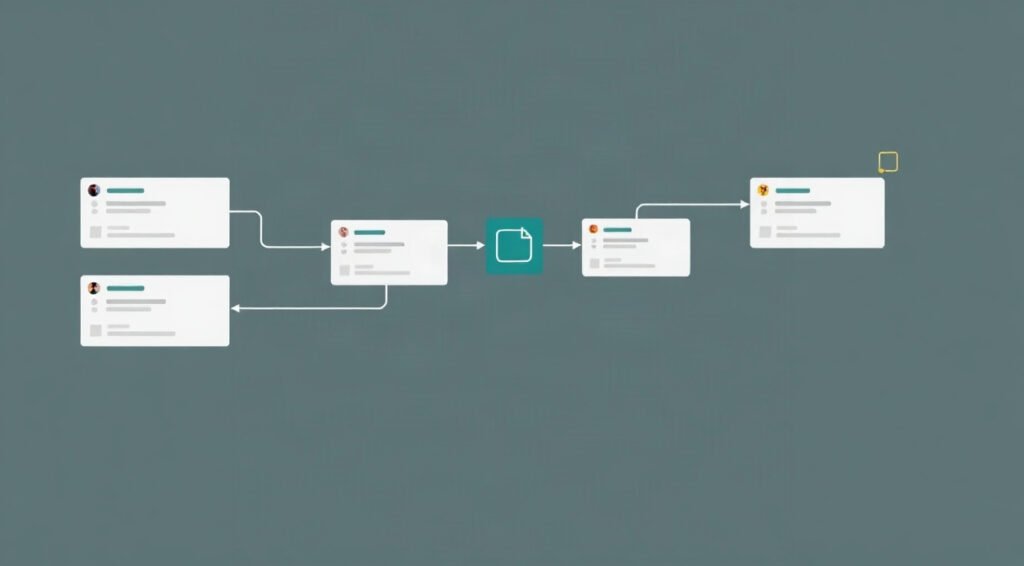
Complex automations often need to handle one record in several ways: enrich it, check it against a policy, and notify a team. Well-designed n8n workflow branching strategies make that work understandable and recoverable, rather than turning a workflow into a tangle of paths.
This guide covers how to route and split items, what parallel execution means in n8n, and how to reunite branch results without losing their context. You will also get practical patterns for errors, timeouts, testing, and scaling.

1. Model n8n workflow branching strategies around the data
Start with the shape of the data and the outcome you need, not with a particular node. A useful branch plan answers three questions: what enters the split, what each path must produce, and what the downstream step needs after the paths reunite. Writing those answers down first helps prevent mismatched items and unnecessary branches.
Suppose a new order arrives as one item containing an order ID, customer record, line items, and shipping address. One task can verify inventory, another can calculate a risk score, and a third can prepare a shipping estimate. Define a shared correlation key, such as orderId, and decide what each task returns. For example, the inventory path could return inventoryStatus, while the risk path returns riskScore.
Keep the original item available throughout the design. A branch that returns only a score can be difficult to combine with the order later if the order ID and customer details have disappeared. Preserve required fields, or deliberately create a compact shared context before routing. Avoid copying sensitive fields into branches that do not need them.
Choose a split that matches the decision
Use an If node when a condition selects one route, such as sending an order to manual review only when a score exceeds a threshold. Use a Switch node when a value maps to several mutually exclusive destinations, such as routing support tickets by category. These are decision branches: normally, only the matching route should handle an item.
Use multiple outgoing connections or an explicit fan-out pattern when the same input must support several independent tasks. This is different from a choice: inventory, risk, and shipping may all need to run for the same order. Make that distinction visible in node names and notes so future editors do not mistake parallel work for exclusive routing.
- Exclusive routing: one item goes to the route that matches a rule.
- Fan-out: one item supplies two or more tasks.
- Looping: one route processes a collection in controlled batches or iterations.
These n8n workflow branching strategies become easier to maintain when each path has a defined input and output contract. For a wider view of how branches fit into end-to-end designs, see these n8n workflow orchestration patterns.
Sketch the contract before building
A simple branch table is often enough: name the task, list its required inputs, specify its output fields, and note whether failure blocks the whole workflow. Decide whether missing output means a genuine failure, a skipped task, or a valid empty result. That distinction determines how the merge should behave.
Do not assume two branches produce the same number of items. A lookup might return no match, one match, or several records. In contrast, a branch that calculates a single order-level score should return one result per order. Record those expectations explicitly. Good n8n workflow branching strategies treat item count and field shape as part of the interface, not as an implementation detail.
2. Build n8n workflow branching strategies with clear routing rules
Once the data contract is clear, make routing conditions deterministic. A rule should be easy to inspect and should handle missing, malformed, and unexpected values intentionally. For a ticket router, for example, normalize the category before matching it. If incoming labels may be uppercase or contain extra spaces, standardize them before the Switch node rather than duplicating cleanup logic in every output path.
Make the fallback route explicit. A default output can catch unknown categories and send them to a review queue, log, or controlled error handler. Without one, a new value may simply fail to reach the intended destination. Include the original value in the review record so an operator can correct the rule or source data.
Separate routing from task work
A reliable layout puts data preparation before the decision and task-specific work after it. For example, normalize a customer record, calculate a single routing field, then use a Switch to send the record to billing, fulfillment, or support. This reduces repeated expressions and makes it easier to check that every route receives consistent data.
For fan-out, keep the shared preparation step upstream and make each task path responsible for one outcome. A useful node naming pattern is verb plus object, such as Fetch Inventory, Score Order Risk, or Build Shipping Quote. Names that describe business work help distinguish paths in execution logs and make a large canvas easier to scan.
When conditions become complicated, move the logic into a dedicated Code node or a sub-workflow with a clear contract. This can be easier to test than repeating long expressions across several routing nodes. Keep the logic visible and document the expected inputs and outputs. Avoid moving simple, readable rules into code merely to reduce the number of nodes.
Control branches that are not always needed
Sometimes a task is conditional while the rest of the workflow can continue. For instance, a refund may require an approval check only when its value crosses a threshold. Use a decision node to create the applicable route, and make sure the non-applicable path still has a defined meaning. If downstream steps require a result either way, return a clear status such as not_required instead of leaving the field absent.
That small choice makes merges predictable. A missing value could indicate a skipped task, a failed service call, or a mapping bug. A status field distinguishes those cases. Use names like approvalStatus and approvalReason rather than overloading a generic result field.
As a workflow grows, create a visual convention for shared preparation, decision points, task paths, and merge points. The guide to n8n workflow visualization techniques offers ways to make complex canvases easier to review. Good n8n workflow branching strategies make the path of every item apparent to someone who did not build the automation.
Before adding a route, ask whether it represents a distinct business outcome or merely duplicates an existing path with a small variation. If the latter, a shared sub-workflow or a parameterized task may be simpler. More branches increase the number of cases to test, monitor, and support. Add them only when they make the business rule clearer.
3. Plan parallel execution in n8n without assuming concurrency
Fan-out and concurrency are related, but they are not the same thing. A workflow can have multiple logical branches while the platform processes branch work according to its execution model. In particular, do not assume that two connected branches in one execution will automatically run at the same instant. Design around documented behavior and verify it in the n8n version and deployment you use.
This matters when a workflow calls three external services. If the calls happen sequentially, total response time can approach the sum of their individual times. True concurrent work may reduce elapsed time, but it also increases pressure on APIs and infrastructure. Think of parallel execution n8n as a deliberate architecture choice with limits, not a visual property of lines on the canvas.
Choose a concurrency pattern that fits the work
For small, independent tasks where simplicity matters more than latency, keep the branches in one workflow and accept the platform’s execution order. This is easy to inspect and can be sufficient when APIs respond quickly. Add sensible timeouts and avoid waiting on work that is not needed by the final output.
When tasks need independent execution or stronger isolation, consider calling separate workflows and designing them to receive a stable input contract. A parent can dispatch tasks, track their identifiers, and collect completion results through an explicit callback or persistence mechanism. This adds coordination work, but it can support retries and independent scaling more cleanly than a large, tightly coupled canvas.
For higher throughput, n8n’s queue mode can distribute workflow executions across workers. Read the official n8n queue mode documentation before choosing this design. Queue mode concerns execution distribution and deployment architecture; it does not mean every branch inside a single execution is automatically concurrent. Measure your own workload and plan for database, Redis, worker, and external-service capacity.
Protect downstream services
Concurrency can create a burst of requests even when the average volume appears modest. If each incoming record triggers three tasks and the system accepts a large batch, the number of outbound calls can multiply quickly. Respect provider rate limits, use batching where supported, and introduce controlled waits or a queue when services cannot tolerate a burst.
Set timeouts at the request or task level so a slow service cannot hold up the full process indefinitely. Define a policy for each dependency: retry transient failures, route permanent failures for review, or use a fallback value when the business allows it. Retries should be bounded and should avoid repeating non-idempotent actions such as issuing a payment or creating a duplicate shipment.
A task that may be repeated should receive an idempotency key, usually derived from a stable business identifier and operation name. If the external service supports idempotency, pass the key through. Otherwise, check for an existing result before repeating the side effect. Parallel execution n8n is safer when every task can tolerate delayed responses, retries, and occasional duplicate delivery.
For batch processing, compare the benefits of splitting items into smaller units with the overhead of starting many tasks. Batches can improve throughput but make partial failures more complex. A useful design records each item’s status and lets successful work remain complete while failed items are retried. This is more resilient than restarting an entire batch because one record encountered a temporary error.

4. Apply workflow data merging techniques that preserve meaning
Merging is where branch designs often become fragile. Two paths can finish with different item counts, field names, or timing, so reconnecting lines alone does not guarantee a useful unified result. Pick the merge behavior based on the data relationship: do you need to combine corresponding results, append independent records, or wait for several task outcomes?
n8n’s Merge node provides different modes for combining inputs. Review the official Merge node documentation for the behavior available in your version. In particular, understand whether a mode pairs items by position, matches on fields, appends items, or waits for inputs. The right choice depends on your contract, not on which option happens to reconnect the canvas most quickly.
Match related records with stable keys
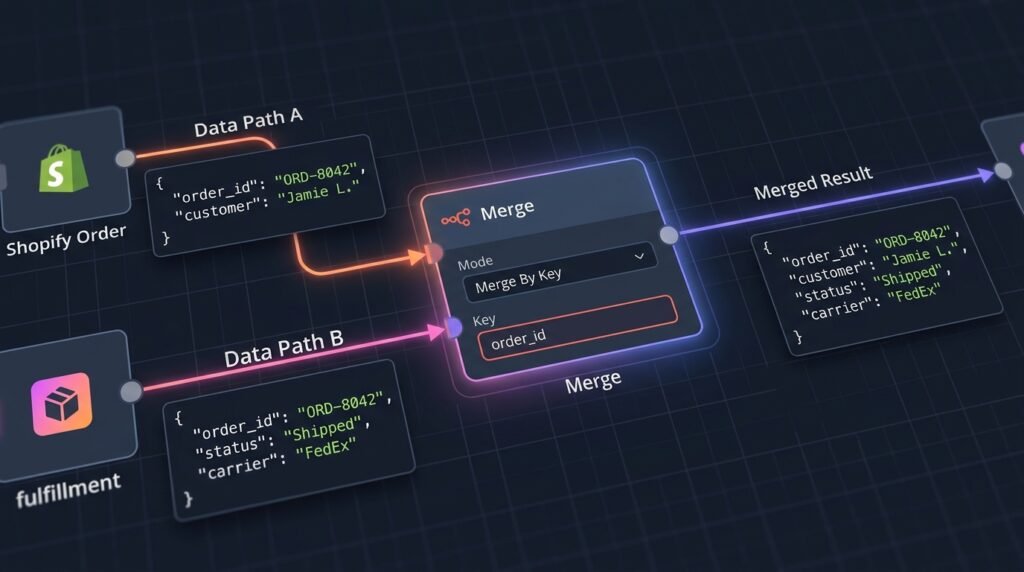
If both branches produce one result per order, pair them using a stable key such as orderId. Position-based matching can appear to work in a small test and silently pair the wrong records later if one branch filters an item or returns results in a different order. Key-based matching is generally safer when items can arrive or be processed in varying sequences.
For example, an order record could be combined with a fraud-check result and a shipping quote. Each branch should carry orderId, and each output should use distinct field names such as riskScore and shippingEstimate. After merging, validate that every expected order has the required fields before proceeding to a customer-facing action.
Choose append or combine intentionally
Appending makes sense when branches produce independent records that belong in one collection, such as separate notification events. It does not create a single enriched record from matching inputs. Combining is appropriate when results describe the same business entity. Document that distinction in a node note or workflow description, especially when both patterns appear in the same automation.
Use workflow data merging techniques to preserve source context without creating field collisions. If both branches return a field called status, one may overwrite or obscure the meaning of the other. Rename fields at the branch boundary, or nest task-specific results under objects such as inventory and risk. A structured output is easier to inspect and safer to extend.
Define what happens when a branch has no match. If missing inventory data should block fulfillment, route the item to an exception path. If a marketing enrichment is optional, allow the order to continue with an explicit value such as enrichmentStatus: unavailable. Do not treat an empty collection as equivalent to success unless the downstream logic can distinguish those cases.
When one branch fails but others succeed, decide whether to fail the whole operation or return a partial result. A complete response may be required for billing or shipping, while an optional recommendation can be omitted. Track the status of each task separately and retain enough diagnostic information to identify which dependency failed. The final output should make partial completion visible rather than presenting it as a normal success.
For asynchronous child workflows, a merge may require a durable coordination step instead of a direct node connection. Store results with the correlation key, check that all required tasks have reported, then assemble the final record. This pattern is more involved, but it avoids relying on timing assumptions when tasks finish independently.
5. Test and operate n8n workflow branching strategies reliably
Test each route as a contract, not just as a successful run. A workflow that passes with one ideal input may still drop records when a field is absent, a branch returns multiple items, or a remote service times out. Build a small test matrix before enabling the automation, and include normal, boundary, malformed, and partial-failure cases.
- Test every exclusive route, including the default or unknown-value path.
- Test fan-out when all tasks succeed and when one task returns an empty result.
- Test a branch with several items and another with a different item count.
- Test timeouts, rate limits, and retry behavior with safe test data.
- Confirm the final output includes the expected correlation key and status fields.
Inspect item flow at each boundary
During development, examine the output of the node immediately before each split, the first node in each branch, and the merge output. Confirm item counts and key fields, not just whether the node shows green. A successful node can still produce data that is unsuitable for the next step. Use representative samples with missing and unusual values.
For production, record useful identifiers and status values without logging secrets or unnecessary personal data. A task log should let an operator answer which record ran, which branch completed, and where a failure occurred. Keep error messages concise and actionable, and route failures to an alert or review queue with enough context to investigate.
Make retries and side effects safe
Retry policies should distinguish temporary errors from permanent ones. A timeout or a service-unavailable response may be temporary; a validation error usually needs corrected input. Use bounded retries with an appropriate delay, and avoid retrying indefinitely. For actions that create or modify external records, check whether the destination supports idempotency or a reliable duplicate check.
Set a clear point at which an item becomes complete. For a multi-task order flow, that might mean all required checks have succeeded and the final record is written. If an optional branch fails, record that status and continue only if the business rule permits it. This makes the automation’s behavior auditable and prevents a misleading all-green outcome.
Review workflow execution history and operational alerts periodically. Look for branch-specific increases in failures, slow calls, or item-count mismatches. If performance is a concern, first identify whether time is spent in external services, data transformations, or task scheduling. The advice in this guide to n8n workflow performance optimization can help you investigate bottlenecks without making changes blindly.
Document decisions that are otherwise difficult to infer: why one branch is optional, which failures are retried, and what each merge mode guarantees. Add a short description to important nodes and keep credentials and sensitive configuration out of notes. A workflow canvas is both executable logic and a maintenance interface for the next person.
As volume grows, estimate how branch count affects task calls, execution duration, and queue pressure. Use monitoring data to guide scaling, and test changes with realistic volumes before widening concurrency. n8n workflow branching strategies should evolve with the workload while keeping the same contracts, failure semantics, and traceability.
Frequently asked questions
Can n8n run branches at the same time?
Do not infer simultaneous execution from multiple connections on the canvas. Branch processing depends on n8n’s execution behavior and deployment setup. For actual workload distribution, investigate queue mode, workers, or separate workflow executions, then verify the design with current documentation and a representative test.
What is the safest way to merge results from different branches?
Choose a merge mode that matches the relationship between the data. Use a stable key to combine results for the same entity, and use append only when records are independent. Preserve correlation IDs, give fields distinct names, and validate the unified output before triggering an irreversible action.
How should I handle a branch that returns no items?
First decide whether the empty result is expected, an optional task, or a failure. Represent the outcome explicitly when downstream steps need to know the difference. These n8n workflow branching strategies prevent an absent item from being mistaken for a successful check or a completed task.
When should I use a sub-workflow for a branch?
Use a sub-workflow when a task has a stable input and output contract, needs reuse, or benefits from independent ownership and execution. For a small one-off transformation, a separate workflow can add more coordination than value. Consider observability and error handling along with reuse.
How do I keep branching logic easy to maintain?
Use clear node names, explicit fallback routes, shared data preparation, and documented output contracts. Test every route and edge case, especially different item counts. In n8n workflow branching strategies, fewer well-defined paths are often safer than many overlapping conditions.
Conclusion: Build branches that reunite cleanly
Reliable branching begins with a clear decision about whether a path is exclusive, shared fan-out, or controlled iteration. Define what each task receives and returns, distinguish logical branching from actual concurrency, and select merge behavior that preserves item identity. Then test the edge cases that can change item counts, timing, and failure outcomes.
Use these n8n workflow branching strategies to create automations that are easier to extend, debug, and operate. If your team needs help designing or implementing a dependable automation system, talk with Seelaunch LLC about your workflow goals.

