
A reliable n8n installation needs more than a container that starts. A production-ready n8n docker compose deployment should keep the editor off the public internet, serve traffic over HTTPS, preserve credentials and workflows across restarts, and make updates recoverable. This guide walks through the architecture, proxy settings, Compose configuration, security hardening, and operational checks needed to run a self-hosted instance with confidence.
The examples use Caddy as the public-facing reverse proxy and PostgreSQL for workflow data. You can adapt the same principles to another proxy or database, but keep the boundaries clear: only the proxy should accept public web traffic, while n8n and the database stay on private Docker networks.
1. Plan the n8n Docker Compose Deployment Architecture
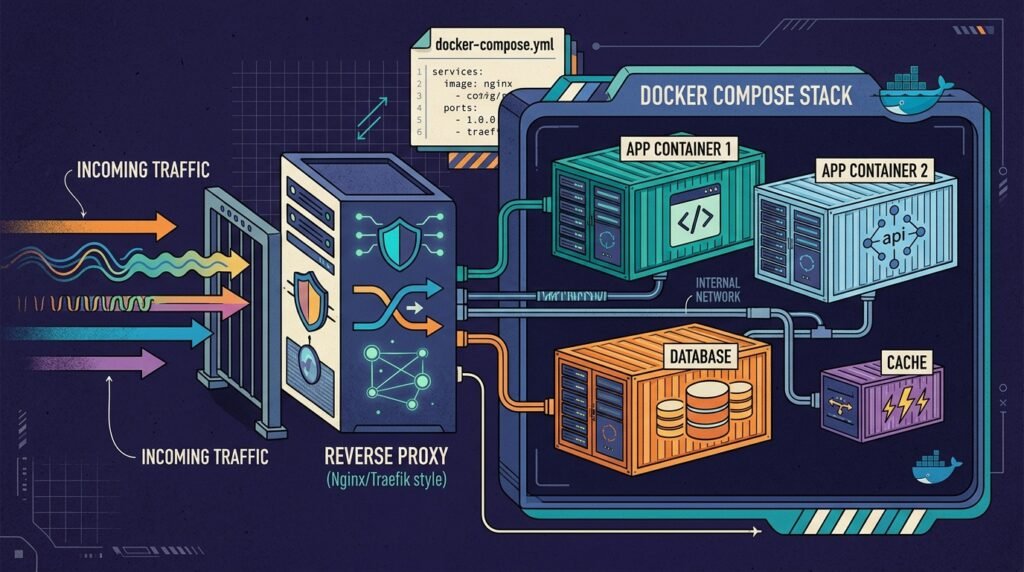
Start by deciding which services need to communicate and which ones must remain private. A typical production stack has three components: a reverse proxy, the n8n application, and PostgreSQL. The proxy receives browser and webhook requests on ports 80 and 443, manages TLS certificates, and forwards approved requests to n8n. The application connects to PostgreSQL over a private Docker network. PostgreSQL should not publish a host port.
This separation is the foundation of a secure n8n docker compose deployment. Publishing n8n’s port 5678 directly can bypass proxy rules and expose the editor without the intended HTTPS and access controls. In the Compose file, use an internal network for n8n and PostgreSQL, and attach n8n to a second network shared with the proxy. Publish only the proxy’s web ports to the host.
Choose a stable hostname, such as flows.example.com, and point its DNS A or AAAA record at the server. Check that inbound ports 80 and 443 are allowed by the host firewall and cloud firewall. If the server sits behind a router or another load balancer, make sure it forwards those ports to the right machine. Certificate issuance can fail when DNS points elsewhere, a firewall blocks validation, or an existing proxy already occupies the ports.
Use a supported database and a persistent volume for n8n’s user data. PostgreSQL stores operational data, while n8n’s volume preserves local application files and settings. Most importantly, generate a strong, stable encryption key and retain it securely. n8n uses this key to encrypt stored credentials. Losing or changing it can make saved credentials unreadable, even if the database itself is intact.
For a first deployment, review the official n8n Docker installation documentation alongside the Docker Compose documentation. Confirm the image version, environment variables, and database support against current guidance before launch. A Compose file is an operational specification, not a substitute for checking version-specific requirements.
Plan recovery before there is an incident. Decide who can access the server, where encrypted backups will live, and how you will restore both the database and the encryption key. The n8n backup and restore continuity guide can help you shape a recovery routine. A careful architecture makes the later self hosted n8n security controls easier to apply and audit.
2. Configure HTTPS and the n8n Reverse Proxy Setup
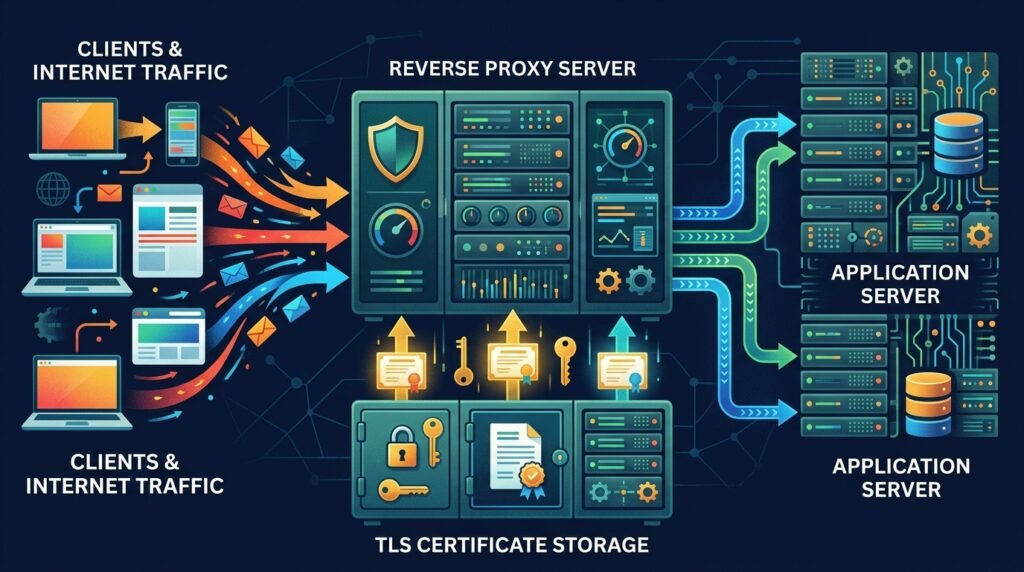
A reverse proxy provides the public entry point for your workflows and editor. It terminates HTTPS, renews certificates, and forwards requests to the n8n service over the Docker network. Caddy is convenient for a small Compose stack because it can obtain and renew certificates automatically when DNS and ports are configured correctly. Nginx and Traefik can provide the same role, but their certificate and routing configuration differs.
In a Caddyfile, define the public hostname and forward requests to the Compose service name, not to localhost:
flows.example.com {
    encode zstd gzip
    reverse_proxy n8n:5678
}
The name n8n resolves through Docker’s service discovery when both containers share a network. Do not point the proxy at 127.0.0.1:5678; inside the proxy container, localhost means the proxy container itself. Persist Caddy’s data and configuration directories so its certificate state survives container replacement. Keep its administrative interface inaccessible from the public network.
Tell n8n its external URL and that it is behind one trusted proxy. Set N8N_HOST to your hostname, N8N_PROTOCOL to https, WEBHOOK_URL to the public HTTPS base URL, and N8N_PROXY_HOPS to the number of trusted proxy hops. With one Caddy instance directly in front of n8n, that value is typically one. If a CDN or load balancer sits in front of Caddy, count and configure the trusted chain carefully; do not trust arbitrary client-supplied forwarding headers.
Correct proxy headers matter because n8n uses external URL information when generating webhook addresses and handling secure cookies. Set N8N_EDITOR_BASE_URL to the public editor URL where appropriate for your n8n version. Use the current n8n proxy guidance to confirm the required forwarded headers, including the original host, protocol, and client address. A mismatched scheme can produce HTTP webhook URLs, redirect loops, or cookies that the browser refuses to send.
Do not assume that HTTPS alone restricts access. TLS protects data in transit, but an exposed login page remains reachable. If the editor should be private, add a VPN or a carefully configured identity-aware access layer, and preserve the webhook routes required by external services. Avoid a blanket proxy password that blocks webhook callers. Test the editor, a real webhook, and redirects from outside your network after bringing the stack up.
3. Build and Validate the n8n Docker Compose Deployment
Use a reviewed Compose file that exposes only the reverse proxy. The following is a starting point, not a universal production template: pin tested image versions, replace example credentials, and compare settings with the documentation for the versions you select. Store the file in a restricted deployment directory, and keep secrets out of source control.
services:
  caddy:
    image: caddy:2-alpine
    restart: unless-stopped
    ports:
      - '80:80'
      - '443:443'
    volumes:
      - caddy_data:/data
      - caddy_config:/config
      - ./Caddyfile:/etc/caddy/Caddyfile:ro
    networks:
      - edge

  n8n:
    image: n8nio/n8n:${N8N_VERSION}
    restart: unless-stopped
    expose:
      - '5678'
    environment:
      DB_TYPE: postgresdb
      DB_POSTGRESDB_HOST: postgres
      DB_POSTGRESDB_PORT: 5432
      DB_POSTGRESDB_DATABASE: ${POSTGRES_DB}
      DB_POSTGRESDB_USER: ${POSTGRES_USER}
      DB_POSTGRESDB_PASSWORD: ${POSTGRES_PASSWORD}
      N8N_HOST: flows.example.com
      N8N_PROTOCOL: https
      N8N_PORT: 5678
      WEBHOOK_URL: https://flows.example.com/
      N8N_PROXY_HOPS: 1
      N8N_ENCRYPTION_KEY: ${N8N_ENCRYPTION_KEY:?set a persistent encryption key}
    volumes:
      - n8n_data:/home/node/.n8n
    networks:
      - edge
      - data
    depends_on:
      postgres:
        condition: service_healthy

  postgres:
    image: postgres:16-alpine
    restart: unless-stopped
    environment:
      POSTGRES_DB: ${POSTGRES_DB}
      POSTGRES_USER: ${POSTGRES_USER}
      POSTGRES_PASSWORD: ${POSTGRES_PASSWORD}
    volumes:
      - postgres_data:/var/lib/postgresql/data
    networks:
      - data
    healthcheck:
      test: ['CMD-SHELL', 'pg_isready -U $${POSTGRES_USER} -d $${POSTGRES_DB}']
      interval: 10s
      timeout: 5s
      retries: 5

networks:
  edge:
  data:
    internal: true

volumes:
  caddy_data:
  caddy_config:
  n8n_data:
  postgres_data:
This example uses an isolated data network for PostgreSQL, while n8n joins both the proxy-facing and data networks. The proxy and n8n communicate through the edge network; PostgreSQL is not attached to it. The expose declaration documents the application port for other containers but does not publish it on the host. Confirm the exact network behavior and any additional settings against your Docker version and hosting environment.
Create a protected environment file containing the selected version, database name and user, a long random database password, and the n8n encryption key. Restrict file permissions to the deployment administrator, exclude it from Git, and do not paste secrets into tickets or logs. Compose environment substitution is convenient, but a file on disk is still a secret that needs access controls and backup protection. Where your platform supports a suitable secrets manager, use it and verify how the chosen images consume secrets.
Before starting, run docker compose config to catch malformed YAML and unresolved variables. Then start the stack and inspect service health and logs. Confirm that only ports 80 and 443 are listening on the public host, that Caddy can reach n8n, and that n8n can reach PostgreSQL. This validation turns the n8n docker compose deployment from a configuration file into a tested service.
Pin versions instead of relying on latest. A fixed version makes deployments reproducible and helps you plan upgrades, although it does not remove the need to patch. Test an upgrade in a staging environment, back up data first, and review release notes for breaking changes. For rollout and safe change practices, see the n8n self-hosting Docker Compose setup guide.
4. Apply Practical Self Hosted n8n Security Controls
After the stack works, reduce the impact of a compromised account, container, or host. Begin with access. Use a strong, unique administrator password, enable supported multi-user controls, and remove accounts that no longer need access. Grant each person the least privilege their work requires. Limit server SSH access to named administrators and use keys rather than password-based remote login where practical.
Restrict the editor separately from incoming webhook endpoints. A VPN, private network, or identity-aware access gateway can limit who can reach the editor, but webhook providers may need public access to specific routes. Verify that your chosen access layer supports those routes and does not interfere with required methods or request bodies. If you add IP restrictions, account for changing provider address ranges and plan how to update them without accidentally exposing the editor.
Keep the host, Docker Engine, Compose plugin, proxy, database, and n8n images patched. Subscribe to security notices, review image provenance, and use tested version updates rather than unattended changes to production. Restrict Docker socket access: anyone with control of the Docker daemon can usually gain powerful control over the host. Do not mount the Docker socket into n8n or a workflow container unless there is a thoroughly reviewed operational need.
Protect secrets throughout their lifecycle. Keep the encryption key stable, back it up separately from the database, and limit access to it. Rotate database credentials and administrator credentials through a planned process, testing that dependent services can reconnect. Avoid putting credentials in workflow names, execution data, shell commands, or public logs. Review which users can create workflows and access credential records, and remove unused credentials promptly.
Container hardening should be measured against n8n’s runtime requirements. Avoid running privileged containers, mounting host directories unnecessarily, or granting extra Linux capabilities. Keep writable volumes limited to data the application needs. A read-only root filesystem or custom user override may sound safer but can break application startup or file writes; test such changes carefully instead of applying them blindly. The best self hosted n8n security posture is one that is both restrictive and operationally verified.
Consider execution data retention as a security control. Workflow input and output can contain personal information, tokens, or business records. Configure retention and pruning to match operational and legal requirements, restrict access to execution history, and avoid logging sensitive payloads unnecessarily. If workflows process regulated or confidential information, document the data path and who can inspect it. Treat backups as sensitive because they may contain credential ciphertext, execution records, and configuration.
Finally, use host firewall rules to allow only necessary inbound traffic. Do not publish the database port for convenience, and do not expose Docker’s remote API. These measures, combined with a correctly configured proxy, make n8n docker compose deployment far more resilient than a one-command installation with every service reachable from outside.
5. Test, Monitor, Back Up, and Maintain the Deployment
Production readiness is demonstrated by tests, not by a successful startup message. From a device outside the server’s network, open the HTTPS editor and confirm the certificate is valid, the browser stays on HTTPS, and no page assets load over plain HTTP. Check that the public hostname resolves correctly and that HTTP requests redirect to HTTPS. Verify that direct requests to port 5678 and the PostgreSQL port fail from the public internet.
Test webhook behavior with a representative workflow. Trigger a test webhook from an external client, confirm that n8n receives it, and inspect the generated URL to ensure it uses the public HTTPS hostname. Then test the production webhook URL with the authentication method the integration requires. If a workflow calls an external API, check the response and inspect logs for accidental exposure of headers, tokens, or request bodies.
Set up monitoring for host disk space, memory, CPU, container restarts, and database availability. Alert on certificate renewal failures, persistent health-check failures, and unexpected service downtime. Use Docker logs for troubleshooting, but configure retention and access controls; unbounded logs can fill disks, while overly broad log access can reveal sensitive information. A monitoring system should notify an owner who can respond, rather than simply collecting metrics nobody reviews.
Back up the PostgreSQL database and n8n’s persistent data, and retain the encryption key in a separate protected location. Encrypt backups at rest, restrict access, and store a copy outside the production server. A backup is not proven until it has been restored. Schedule a test restore into an isolated environment, verify that workflows and credentials are available, and record the steps and approximate recovery time. The n8n docker compose deployment is only recoverable when both data and the key needed to decrypt credentials are available.
Keep a simple change record for image versions, environment changes, proxy edits, firewall rules, and recovery tests. Before each update, check release notes, take a backup, and test the candidate version with representative workflows. After deployment, confirm service health, editor access, webhook delivery, database connectivity, and scheduled executions. If a check fails, use a known-good image version and documented rollback steps rather than making hurried edits directly in production.
Operational visibility helps you find slow failures before users report them. Track workflow failure rates and execution duration, and investigate sudden changes. The n8n workflow monitoring dashboard setup guide offers ideas for making workflow health easier to review. For teams running heavier workloads, revisit worker and queue architecture as demand grows instead of increasing resources without measurement.
Finally, review access and retention periodically. Remove inactive accounts and stale credentials, confirm that backup jobs still succeed, and check that public ports have not changed after infrastructure updates. These recurring checks keep self hosted n8n security aligned with the actual system rather than the original deployment plan.
Frequently Asked Questions
Can I expose n8n directly on port 5678?
It is better to keep port 5678 private and publish only the reverse proxy’s HTTPS ports. Direct exposure can bypass the TLS termination, routing, and access controls that form part of a secure n8n docker compose deployment. If you need temporary troubleshooting access, use a trusted private network or SSH tunnel and remove the exception afterward.
Does Caddy automatically provide SSL certificates?
Caddy can obtain and renew certificates automatically when the hostname points to the server, required ports are reachable, and its certificate data is persistent. Automatic issuance is not guaranteed if DNS, firewall rules, or another service interfere. Check proxy logs and test certificate renewal as part of ongoing maintenance.
Why does n8n generate an incorrect webhook URL?
Common causes include a missing or incorrect WEBHOOK_URL, a mismatched HTTPS setting, or an incorrect proxy-hop count. Ensure the proxy forwards the relevant headers and that n8n trusts only the actual proxy chain. A sound n8n reverse proxy setup must be tested with a real external webhook, not just by loading the editor.
Do I need PostgreSQL for a self-hosted installation?
n8n supports different database options, and the right choice depends on workload, recovery objectives, and current product guidance. PostgreSQL is a common choice for production deployments because it provides a separate database service and established backup tooling. Whichever option you select, persist the data and test restoration.
What should I back up to recover credentials?
Back up the database and relevant n8n persistent data, and preserve the stable encryption key securely. Protect backups as sensitive information, keep an off-host copy, and perform a test restore. Restoring database files without the key may leave encrypted credentials unusable.
How should I update a production Compose stack?
Review release notes, choose explicit image versions, make a backup, and test the update in staging where possible. After applying it, check health, editor access, webhook delivery, scheduled runs, and logs. Keep a documented rollback plan, especially for database or configuration changes that may not be reversible by changing an image tag alone.
Conclusion: Deploy n8n with Security Built In
A dependable n8n docker compose deployment combines private service networking, a correctly configured HTTPS reverse proxy, persistent storage, protected secrets, and tested recovery procedures. Start with the architecture, validate each boundary, and keep versions and access under deliberate control. Then make security and restore testing part of regular operations, not a one-time setup task.
Need help planning a secure automation environment or putting your deployment into production? Talk with Seelaunch about your automation goals and build a setup that fits your workflows, team, and risk requirements.

