

Most automation platforms boast hundreds of integrations, yet the moment your business touches a niche CRM, a regional shipping provider or a homegrown internal API, the connector list runs dry. That is exactly where the n8n HTTP Request node earns its place as the most valuable building block in your toolkit: it acts as a universal adapter that can talk to virtually any REST endpoint without waiting for anyone to publish a native integration. In this n8n API integration tutorial, you will learn how to configure requests, choose the right authentication method, paginate through large datasets and ship real business workflows that connect third party APIs in n8n with confidence.
Why the HTTP Request Node Is Your Universal Connector
n8n ships with more than 400 native integrations, covering everything from Slack to Salesforce. But the long tail of business software — regional ERPs, legacy databases wrapped in REST, freshly launched SaaS tools — will never all receive dedicated nodes. The n8n HTTP Request node closes that gap: as long as a service exposes a REST API, you can call it directly from any workflow.
Native nodes are convenient because they pre-configure authentication and field mapping, but underneath they are simply HTTP calls with a friendly interface. Once you master the generic node, no API is out of reach, and “no integration available” stops being a dead end.
When to Reach for the HTTP Request Node
- No native node exists for the service you want to integrate.
- A native node lags behind and lacks a newer endpoint or field you need.
- You call internal or private APIs hosted inside your own infrastructure.
- You need granular control over headers, query parameters or the raw response body.
- You prototype fast before deciding whether an integration deserves a permanent workflow.
In short, whenever flexibility beats convenience, the n8n HTTP Request node is the right tool. The official n8n documentation at docs.n8n.io documents every option discussed below, so keep it open in a second tab while you build.
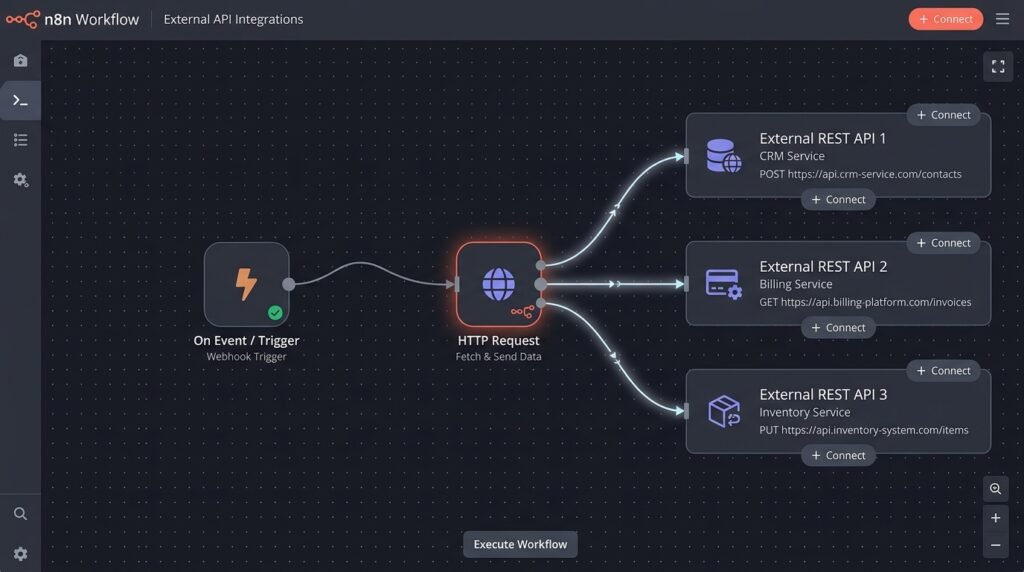
Building Your First Request: The Seven Proven Steps
Every successful call follows the same sequence. Work through these seven steps in order and the n8n HTTP Request node will connect almost any REST API on your first attempt.
- Identify the endpoint. Open the API documentation and note the exact URL, the required HTTP method and the expected response format.
- Add the node. Insert the HTTP Request node into your workflow and pick the method: GET to read data, POST to create, PUT or PATCH to update, DELETE to remove.
- Build the URL. Enter the base URL and append query parameters in the dedicated editor so special characters are encoded correctly.
- Attach authentication. Select a stored credential or add headers manually — the next section covers every scheme in detail.
- Compose the body. For POST and PUT calls, set the body type to JSON and map fields from earlier nodes with expressions such as
{{ $json.email }}. - Send a test request. Execute the node once and inspect the raw response to verify status codes and payload structure.
- Map the output. Reference the returned JSON in downstream nodes, renaming fields where necessary so later logic stays clean.
Master this sequence once and the n8n HTTP Request node becomes predictable rather than intimidating, no matter which vendor sits on the other end.
Sending a Body and Reading the Response
The body editor accepts JSON, form data, multipart uploads and raw text, but JSON is the default for virtually every modern REST API. A typical POST that creates an invoice looks like this:
POST https://api.acmecorp.com/v1/invoices
Content-Type: application/json
{ "customer_id": "{{ $json.customerId }}", "amount": 149.00, "currency": "USD" }
On the response side, the n8n HTTP Request node can auto-detect the content type, parse JSON into individual fields, or pass binary data such as PDFs straight through for file-based workflows. Crucially, you can tell it to treat non-2xx status codes as errors, so a failing call stops the workflow loudly instead of silently feeding broken data downstream.
A Quick Word on Testing Discipline
Before wiring a new endpoint into a production workflow, run it against a sandbox or read-only resource. Confirm what a 404 looks like, what an empty result set looks like and how long a typical call takes. Ten minutes of testing prevents hours of debugging a half-built integration later.
Authentication Methods That Just Work
Authentication is where most API projects stall, so it deserves its own section. The n8n HTTP Request node supports every common scheme, and the golden rule never changes: store secrets in n8n credentials, never in plain workflow fields.
Header Auth and API Keys
Most modern SaaS APIs use a static key sent as a header, such as X-API-Key: your-key or Authorization: Bearer your-token. Create a Header Auth credential, paste the name and value once, and reuse it across every workflow. Because credentials are stored encrypted, rotating a key means updating one place instead of hunting through dozens of flows. When a provider insists on passing the key as a query parameter instead, the node handles that too — though headers are always the safer default.
Basic Auth and Digest Auth
Older systems, internal tools and many self-hosted services still rely on username and password pairs. The Basic Auth credential handles base64 encoding for you, while Digest Auth is available as a separate credential type for legacy enterprise appliances.
OAuth2 Without Tears
OAuth2 intimidates newcomers, but n8n does the heavy lifting. For services following the standard authorization code flow, choose the Generic OAuth2 credential, paste the authorization and token URLs from the provider’s documentation, add your client ID and secret, and select the required scopes. n8n opens the consent screen, captures the callback and refreshes tokens automatically before they expire. You configure it once and forget it — exactly how authentication should behave in production.
Pre-Flight Authentication Checklist
- Confirm the exact header names —
Authorization,X-Api-KeyandApi-Tokenare all common. - Check whether the provider requires a prefix such as
BearerorTokenbefore the key. - Note token lifetimes and verify whether refresh happens automatically.
- Test against a read-only endpoint, such as listing records, before writing anything.
Pagination: Pulling Every Page Without Losing Data
APIs rarely return an entire dataset in one response. When a customer list grows past a few thousand records, the server slices it into pages — and a workflow that reads only page one silently misses data. Handling pagination correctly is what separates a weekend demo from a production system, and it is the part casual overviews skip but every serious n8n API integration tutorial must cover.
The n8n HTTP Request node includes built-in pagination options: you define which parameter changes on each request and when to stop, and n8n loops internally until every page is collected. For more complex schemes, pair the node with a loop and increment the offset using an expression such as {{ $json.offset + 100 }}.
Offset and Limit Pagination
The classic scheme uses query parameters like ?limit=100&offset=0. Configure the pagination settings to update the offset after each run and to stop when a response returns fewer records than the limit. The collected pages arrive merged, ready to process as one dataset.
Cursor-Based Pagination
Modern platforms return a cursor — often named next_cursor or page_token — inside each response body. Copy that value into the next request’s cursor parameter and repeat until it comes back empty. Because the built-in pagination settings accept expressions, you can reference the previous response body directly, with no external loop required.
Link Headers and Other Edge Cases
Some APIs signal the next page in a Link response header instead of the body. Parse the header, extract the next URL and feed it back into the node until no link remains. It adds one extra step, but the pattern is identical in spirit to cursor pagination.
Rate Limits and Throttling
Aggressive pagination can trip rate limits. Protect your workflows with three habits:
- Enable Retry on Fail so transient 429 and 5xx responses are retried automatically with a delay.
- Insert a short wait between batches when a provider documents a strict requests-per-minute ceiling.
- Log failed pages to a separate branch so a long sync can resume instead of restarting from zero.
Because the n8n HTTP Request node logs every response, you can always inspect exactly where throttling began and resume from that page rather than guessing.

Real-World Business Integrations You Can Ship Today
Theory is nice; billable outcomes are better. Here are four patterns our team at Seelaunch builds repeatedly for clients, and every one of them runs on the n8n HTTP Request node.
1. Enriching CRM Leads on Form Submission
When a prospect submits a website form, trigger the workflow, extract the business email domain and call an enrichment API that returns company size, industry and revenue band. POST the enriched payload into your CRM through its REST endpoint, then route high-value leads straight to a sales rep. The whole round trip takes seconds and eliminates hours of manual research every week.
2. Syncing E-Commerce Orders to Accounting
Online stores frequently lack a native connector to accounting platforms. A scheduled workflow can pull yesterday’s orders with a paginated GET request, transform line items into the accounting system’s invoice schema and POST each invoice. Here the n8n HTTP Request node does the heavy lifting twice: once to read, once to verify. Finish with a confirmation GET so discrepancies are flagged before month-end closes.
3. Consolidating Support Tickets Across Tools
Companies that migrate help desks rarely migrate cleanly. Poll both the legacy and the new ticket APIs on a schedule, normalize the JSON structures with a Set node, merge the streams and push a daily digest to Slack or email. Because both endpoints are plain REST resources, a single n8n HTTP Request node configuration serves them both — a textbook case of why teams connect third party APIs in n8n rather than waiting for vendors.
4. Monitoring Reviews and Mentions on a Schedule
Reputation platforms charge a premium for what is often simple polling. Connect a Schedule Trigger to a review platform’s public API, filter for low-star entries and post an instant alert to the owner’s chat tool. It is one of the fastest ways to connect third party APIs in n8n and see measurable ROI within days.
If you are still weighing n8n against other platforms before committing, our comparison of leading automation tools on the Seelaunch blog breaks down where each one shines.
Can the n8n HTTP Request node refresh OAuth2 tokens automatically?
Yes. When you use the Generic OAuth2 credential type, n8n stores the refresh token and exchanges it for a new access token before requests fail. You only complete the initial consent flow once.
How do I test an API before building a full workflow?
Use a manual trigger and execute the HTTP Request node in isolation. Inspect the raw response in the output panel, confirm status codes and field names, then build downstream logic on top of verified data.
What is the difference between a native integration and the HTTP Request node?
Native nodes pre-configure authentication, endpoints and field mappings for one specific service. The n8n HTTP Request node is generic: you supply the URL, headers and payload yourself. Native nodes are quicker to set up; the generic node offers unlimited flexibility and is the only option when no dedicated node exists.
How many pages can the n8n HTTP Request node fetch in one run?
There is no hard page cap; the built-in pagination loop continues until your stop condition is met. In practice, schedule large syncs in batches, keep individual runs reasonable and monitor execution time so long workflows stay manageable.
Can I upload files or receive binary responses?
Yes. Set the response format to file to receive binary data such as PDFs or images, and use multipart form data in the body to upload documents. That makes patterns like “download a report, then email it” straightforward to build.
How do I handle APIs that return XML instead of JSON?
Many legacy services still speak XML. Have the n8n HTTP Request node return the response as text, then pass it through the XML node to convert it into JSON for downstream processing. The reverse pattern works for outgoing payloads when an older API demands XML input.
What happens if an API is down or returns an error?
Enable Retry on Fail with a sensible delay, and branch your workflow so failures notify your team instead of dying silently. For critical processes, log every failed request to a spreadsheet or database so it can be replayed later without data loss.
Frequently Asked Questions
Can the n8n HTTP Request node refresh OAuth2 tokens automatically?
Yes. When you use the Generic OAuth2 credential type, n8n stores the refresh token and exchanges it for a new access token before requests fail. You only complete the initial consent flow once.
How do I test an API before building a full workflow?
Use a manual trigger and execute the HTTP Request node in isolation. Inspect the raw response in the output panel, confirm status codes and field names, then build downstream logic on top of verified data.
What is the difference between a native integration and the HTTP Request node?
Native nodes pre-configure authentication, endpoints and field mappings for one specific service. The n8n HTTP Request node is generic: you supply the URL, headers and payload yourself. Native nodes are quicker to set up; the generic node offers unlimited flexibility and is the only option when no dedicated node exists.
How many pages can the n8n HTTP Request node fetch in one run?
There is no hard page cap; the built-in pagination loop continues until your stop condition is met. In practice, schedule large syncs in batches, keep individual runs reasonable and monitor execution time so long workflows stay manageable.
Can I upload files or receive binary responses?
Yes. Set the response format to file to receive binary data such as PDFs or images, and use multipart form data in the body to upload documents. That makes patterns like “download a report, then email it” straightforward to build.
How do I handle APIs that return XML instead of JSON?
Many legacy services still speak XML. Have the n8n HTTP Request node return the response as text, then pass it through the XML node to convert it into JSON for downstream processing. The reverse pattern works for outgoing payloads when an older API demands XML input.
What happens if an API is down or returns an error?
Enable Retry on Fail with a sensible delay, and branch your workflow so failures notify your team instead of dying silently. For critical processes, log every failed request to a spreadsheet or database so it can be replayed later without data loss.
Conclusion: Connect Any API, Automate Any Process
The n8n HTTP Request node turns n8n from a workflow builder into a universal integration platform. Once you can authenticate, paginate and map responses with confidence, the absence of a native node stops being a blocker and becomes a footnote. This n8n API integration tutorial walked through the seven steps, the authentication patterns and the pagination strategies that make production integrations reliable — the same foundations we use to connect third party APIs in n8n for clients every week.
Want these patterns running in your own stack? The automation team at Seelaunch LLC designs, builds and maintains API-driven workflows so you can focus on running the business. Read more hands-on guides on the Seelaunch blog, or contact us through seelaunchllc.com to talk through your integration roadmap today.

